

You ordered a pair of headphones. The delivery date has passed, and the package still has not arrived. You open the shopping app and type:
“Where is my order? It was supposed to arrive yesterday.”
An AI assistant can write a polite response immediately. But how would it know what happened to your parcel?
It needs your order record, the courier’s latest update, and a way to handle missing information. If you ask for further help, it may also need access to the store’s support system.
Harness engineering is the work of making that process function reliably around the AI model.
Let’s follow this one familiar situation from question to answer. The order numbers, times, and responses below are demo data for a realistic application—not records from an actual retailer.
First, what is an AI harness?
An AI harness is the software around an AI model that manages its interaction with tools and the working environment. It supplies information, handles tool requests, returns results, and controls when the process continues or stops. Anthropic describes the harness as the loop that calls the model and routes its tool calls. [1]
Harness engineering means designing and improving that supporting system. In a broader engineering sense, this can also include documentation, test environments, and feedback mechanisms that help an agent do useful work. OpenAI describes this wider approach in its work with coding agents. [2]
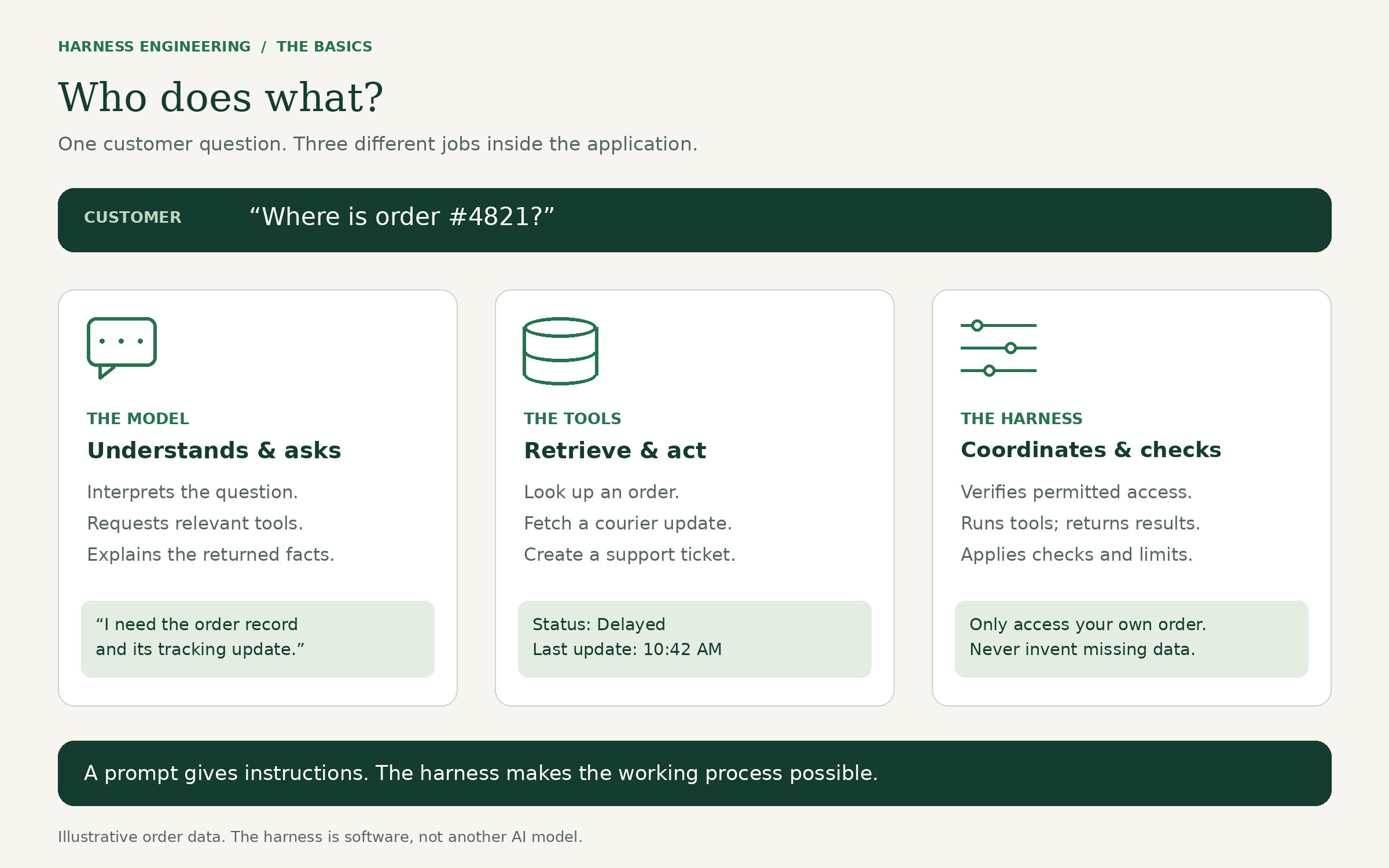
Think of a customer support employee. They understand your question, but they still need a computer, access to order records, company policies, and an escalation process.
The AI model plays the part of the person interpreting the request. The harness supplies and coordinates the working setup.
The analogy has limits: a model can still misunderstand a tool result. Giving it a good working environment does not make every decision correct.
The three parts students should understand
Before looking at the whole process, separate these three jobs:
| Part | What it does | In our delivery example |
|---|---|---|
| Model | Interprets language and proposes a next action or answer. | Recognizes that “Where is my order?” needs tracking information. |
| Tool | Performs a specific operation through software. | Looks up an order or fetches a courier update. |
| Harness | Runs the interaction, controls access, records results, and applies checks. | Verifies access, executes a permitted lookup, returns the result to the model, and handles failure. |
A tool can be an ordinary function your application exposes to the model. An API is an interface that lets one software system request information or actions from another.
The model might request get_tracking_status. Your application actually calls the courier API. The model does not gain access to the courier’s database just because you mention it in a prompt.
Follow a real-world request, step by step
Imagine a signed-in customer asks:
“Where is order #4821? It was due yesterday.”
The application receives that question at 10:45 AM.
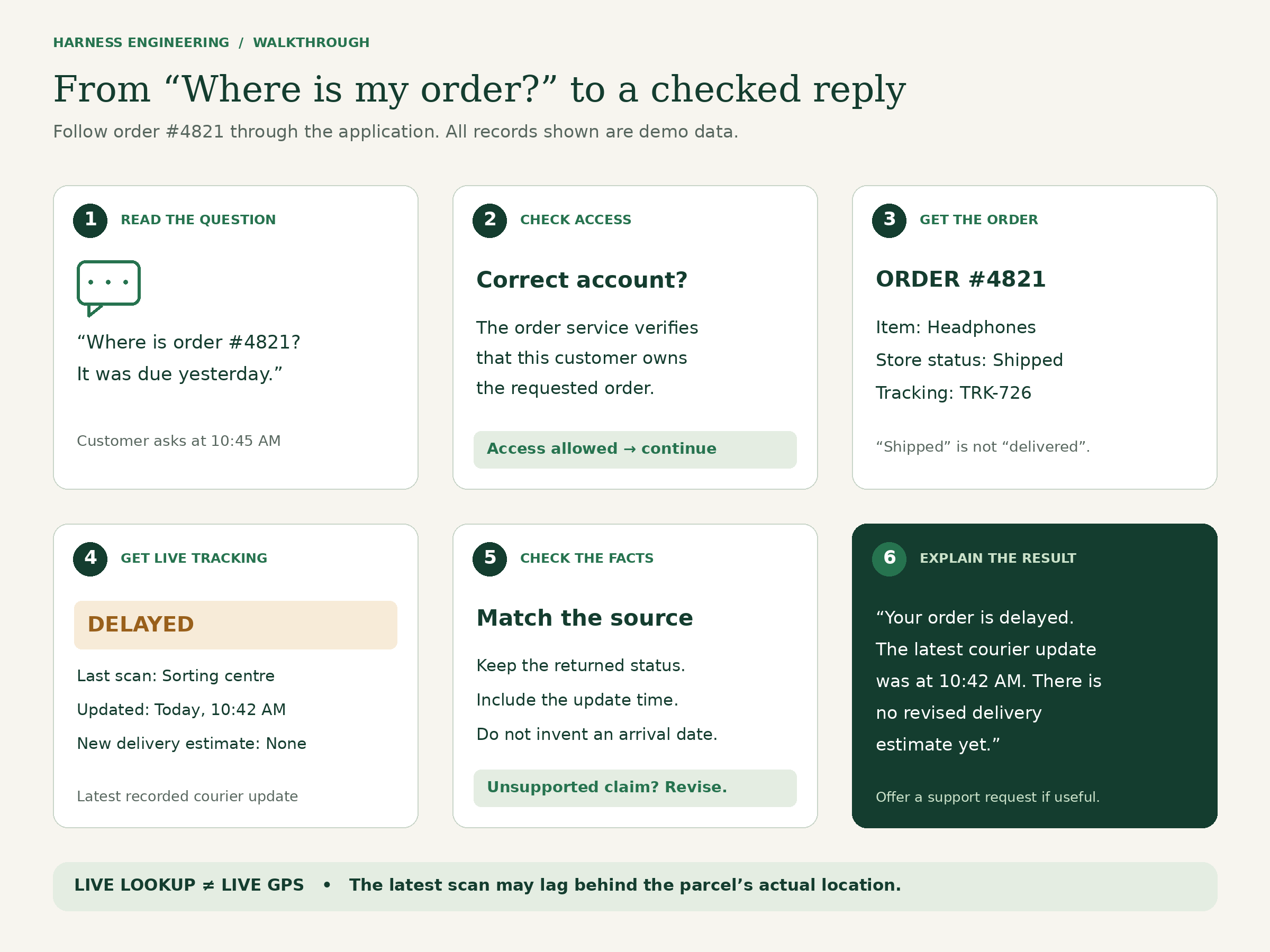
Step 1: Establish what the customer can access
Before returning order information, the application checks that order #4821 belongs to the signed-in account.
An order number alone is not proof of ownership. Someone could type another customer’s number.
This check belongs in application code or the order service. A sentence in the prompt saying “respect customer privacy” does not replace access control.
Step 2: Retrieve the order record
The assistant requests the order lookup tool. After checking access, the application runs it and returns a structured result:
Order: 4821
Item: Headphones
Store status: Shipped
Tracking reference: TRK-726
Original delivery date: Yesterday
Now the model has a tracking reference it can use for the next step.
Notice the distinction: “shipped” tells us the store dispatched the parcel. It does not tell us whether the courier has delivered it.
Step 3: Request the courier’s latest update
The assistant requests a tracking lookup for TRK-726. The tool returns:
Courier status: Delayed
Last scan: Regional sorting centre
Last update: Today, 10:42 AM
Revised delivery estimate: Not available
The harness records the result and makes it available to the model.
This is what makes the application connected to live information: it queries an external source during the task. The model’s training data could not contain this customer’s current delivery status.
Even then, the latest recorded update is not necessarily the parcel’s exact location at this second. A courier may update its system only after a scan. A good answer should preserve that distinction.
Step 4: Check what the answer can honestly claim
Suppose the assistant drafts:
“Your order is delayed, but it will arrive tomorrow.”
The tool result contains no revised delivery estimate. The second part is unsupported.
For this prototype, design the response as structured fields: order number, status, last update, last recorded location, and delivery estimate. Code can compare those fields with the retrieved values. If the source has no estimate, the delivery-estimate field must remain empty.
A template can then produce the final customer-facing message. If you allow freely generated prose, additional review may be needed; a basic field check cannot prove that every sentence is accurate.
Step 5: Return an answer grounded in the records
A suitable response would be:
“Order #4821 is delayed. The courier’s latest update, recorded today at 10:42 AM, shows your parcel at the regional sorting centre. There is no revised delivery estimate yet. Would you like me to raise a support request?”
The answer explains what is known and what is missing. It avoids inventing a delivery date.
Step 6: Confirm an action actually succeeded
If the customer says yes, the application can allow a support-ticket tool to run. It should include the information already collected, so the customer does not have to repeat everything.
If the tool returns ticket S-1048, the assistant can say:
“I created support request S-1048 for order #4821.”
If the tool fails, the assistant must not claim that a ticket exists. Sending a request and successfully completing it are different events.
What happens when the courier system is unavailable?
This is where a carefully designed harness becomes especially useful.
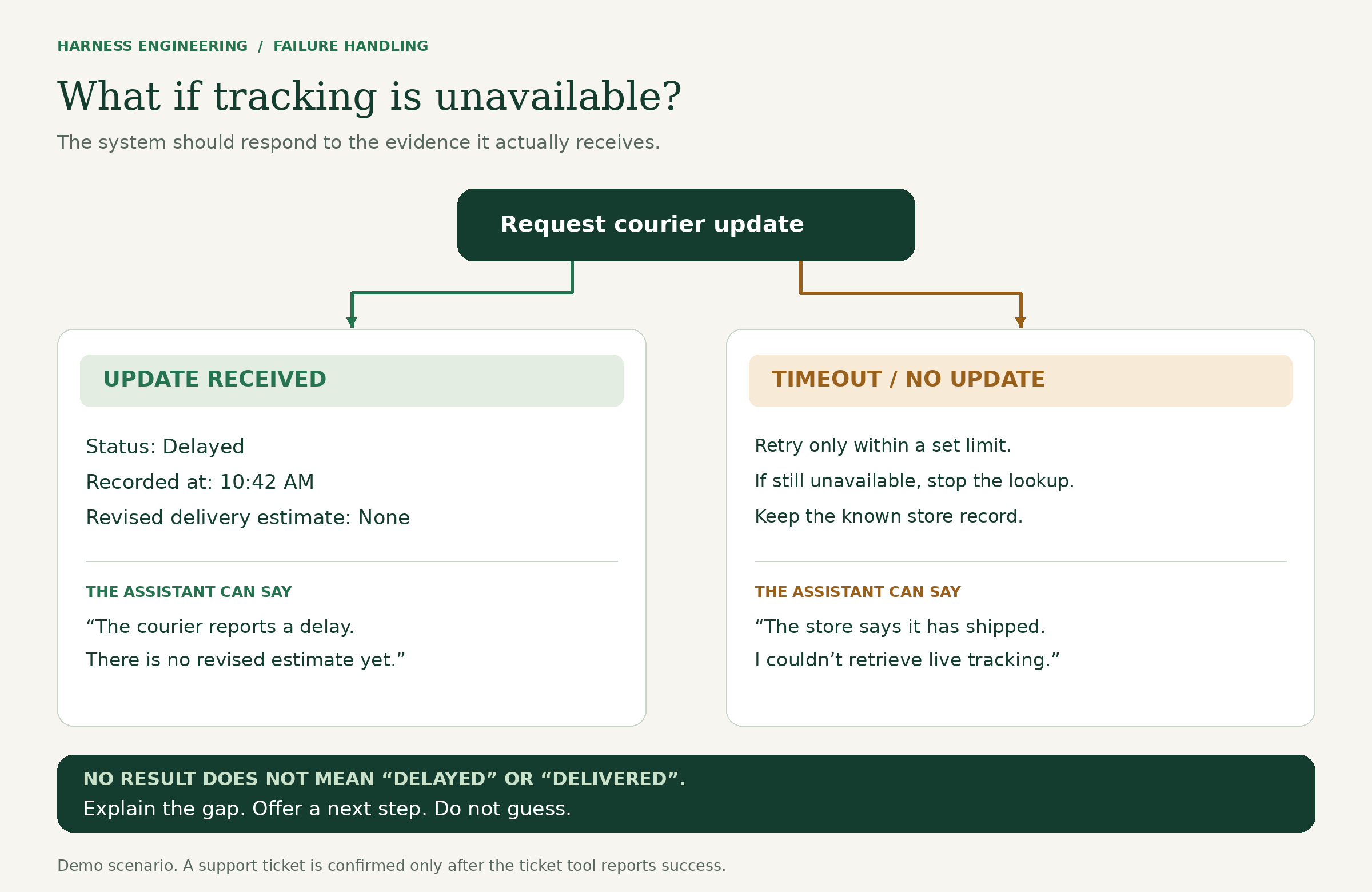
Imagine the courier lookup times out. The system has an order record saying “shipped,” but no current tracking result.
A reasonable design could make one retry, then stop if the service remains unavailable. The assistant could respond:
“The store record shows that your order has shipped, but I couldn’t retrieve the courier’s latest update. I can’t confirm its current delivery status. You can try again shortly or ask me to raise a support request.”
It should not turn an unavailable result into “delayed,” “out for delivery,” or “arriving today.” Those are different claims requiring evidence.
The harness defines the timeout, retry limit, saved progress, and fallback route. The model helps explain the situation in language the customer understands.
If a ticket-creation request times out, there is another complication: it may have succeeded even though the response was lost. Before retrying, the application should check whether the ticket exists or use a unique request identifier that prevents duplicate creation.
Why not just write a better prompt?
A better prompt helps. For example:
“Explain the latest tracking status clearly. Never invent a delivery estimate.”
But that instruction cannot fetch a courier record, verify account ownership, or create a support ticket by itself.
The three related ideas work together:
| Idea | The question it answers | Example |
|---|---|---|
| Prompt engineering | How should we instruct the model? | Ask it to distinguish confirmed updates from estimates. |
| Context engineering | What information should it receive? | Supply the relevant order, courier result, and support policy. |
| Harness engineering | How should the task run and be checked? | Execute lookups, enforce access rules, manage failures, and verify completion. |
These are overlapping responsibilities, not a ranking in which one makes the others unnecessary.
How can a student build a small version?
Start with a narrow goal: answer tracking questions for a few test orders. Add support-ticket creation only after the read-only version works.
1. Create a small practice dataset. Include an in-transit order, a delayed order, and a delivered order. Give each one an owner, tracking reference, and timestamp. Use fictional customer records.
2. Write two tools. One retrieves an authorized order. The other returns a tracking update. At first, both can read local JSON files. This simulates a live integration; it does not make the data live. Later, an authorized courier API could supply actual updates.
3. Connect a model. Give it clear instructions and descriptions of the tools it can request. Your application receives those requests and executes only permitted operations.
4. Preserve useful state. Store the selected order, completed lookups, and unresolved problems. The harness must deliberately provide relevant saved information on later model calls; memory does not appear automatically. Progress records are also useful in longer tasks spanning multiple sessions. [3]
5. Add checks and limits. Validate tool arguments, enforce account access, set timeouts, limit tool calls, and compare response fields with source values. Record enough information to investigate failures without unnecessarily logging private customer data.
6. Test the complete interaction. Try the same request under different conditions and examine the actual records and actions, not just the wording of the final response.
A compact version of the process is:
Receive the question and authenticated account context.

Within the configured time, cost, and step limits:
    Give the model the relevant information.
    Receive a tool request or a proposed answer.

    For a tool request:
        Check permission and validate the arguments.
        Execute the tool with a timeout.
        Return its result or error to the model.

    For a proposed answer:
        Check its structured facts against the records.
        Return it if the checks pass.
        Otherwise, provide feedback for revision.

If a limit is reached:
    Explain the limitation and offer an appropriate next step.
This is pseudocode showing the control logic. A working application still needs model integration, tools, authentication, storage, and error handling.
How do you test whether it is working?
An evaluation, often shortened toeval, is a task with defined expectations used to assess the system. An evaluation harness runs and grades those tests; the agent harness runs the assistant itself. [5]
For the tracking assistant, start with these cases:
| Test case | Expected behaviour |
|---|---|
| Valid order with a recent courier update | Report the matching status and timestamp. |
| Customer requests someone else’s order | Do not reveal the order details. |
| Courier provides no delivery estimate | Do not invent one. |
| Tracking service is unavailable | Explain that the latest status could not be retrieved. |
| Ticket creation fails | Do not claim that a ticket was created. |
| The same ticket request is retried | Avoid creating duplicate tickets. |
Repeat tests because model output can vary. Track incorrect claims, successful task completion, time, and cost. A friendly tone is valuable, but it is not a substitute for a correct result.
When should you use it—and when is it unnecessary?
Harness design matters when an AI application must use tools, respond to intermediate results, manage several steps, or perform actions within limits.
But our basic tracking example also reveals an important engineering choice: if every request follows the same fixed sequence, an ordinary workflow may be enough. Your code can fetch the order, fetch tracking, and fill a response template without an agent choosing the steps.
An agent becomes more useful as requests vary: “Where is my order?”, “The courier says delivered but I haven’t received it,” or “Please help me report a missing parcel.” Different requests may need different records, policies, and follow-up questions.
Anthropic recommends starting with the simplest approach that meets the need; agents can introduce extra cost and delay. [4]
Where else can the same idea be used?
The following are possible application designs, rather than claims about specific deployed products:
| Industry | Task | What the supporting system provides |
|---|---|---|
| Software development | Investigate and fix a bug. | Project files, permitted editing tools, a test environment, and test feedback. |
| Education | Check a project submission against a rubric. | The rubric, submitted files, evaluation criteria, and teacher review. |
| Manufacturing and IoT | Investigate an unusual sensor reading. | Timestamped readings, equipment records, manuals, and an operator handoff. |
| Retail operations | Prepare a restocking proposal. | Inventory data, sales records, calculations, and purchase approval rules. |
In an IoT application, the timestamp matters just as it did for the parcel. A temperature reading from an hour ago cannot establish the machine’s temperature now.
Across these examples, the engineering questions remain practical: What information does the model need? Which actions can it request? How will the system check the outcome? What should happen when something fails?
What students should take away
A useful AI application needs more than an impressive answer on a successful demo.
In our example, the work includes finding the correct order, respecting access rules, retrieving the courier’s update, preserving its timestamp, and refusing to invent missing information. If the customer requests an action, the application must check that it actually happened.
That is the purpose of harness engineering: to make the process around the model explicit, controllable, and testable.
For your first project, build the smallest version you can inspect from beginning to end. Then deliberately break a tool, remove a field, or provide an unauthorized order number. How your application responds will teach you more than another perfect demonstration.
Sources and further reading
- Anthropic, Scaling Managed Agents: Decoupling the brain from the hands.
- OpenAI, Harness engineering: leveraging Codex in an agent-first world.
- Anthropic, Effective harnesses for long-running agents.
- Anthropic, Building effective agents.
- Anthropic, Demystifying evals for AI agents.